The Right to Resist Optimization
∞ Aug 8, 2026“If machines are great at the things we’ve long thought to be uniquely human, maybe we’ve been misunderstanding humanity all along.”
This weekend I picked up a physical copy of The Humanist Review of AI at Casa Magazines, a collection of essays on AI by technologists, academics, and philosophers compiled by Mustafa Suleyman, the head of Microsoft AI. Audrey Tang’s essay, AI and democracy: the right to resist optimization, stood out for the way it reframes a conversation that’s become a little bleak.
The reassurance we keep hearing goes something like this: Sure, LLMs can write songs and novels and will probably make movies soon, but don’t worry—humans will always have taste. It’s a pretentious consolation, and probably not even true. A probabilistic system armed with design principles can make evaluations of taste just fine.
For better and worse, humans are no longer unique for having ideas or for writing them down. What remains unique is our ability to stand behind our creations—to be accountable for them and to love them. People flock to IMAX theaters not out of love for the film format, but because a director like Christopher Nolan made a stand for it. It’s the person behind a creation that gives it meaning; the audience trusts him.
Tang, like our own Josh Clark, argues that Turing’s imitation game has been a trap from the start. We shouldn’t build machines to imitate us—and we shouldn’t evaluate ourselves like machines either. She points to social media, where content is ranked by engagement, as a case of humans optimizing themselves against a machine’s metric. It’s hard not to think of education, where standardized tests reward answering questions on short passages, so classrooms assign excerpts instead of books—and students stop reading books at all. We keep building the very world we say we’re afraid of.
So what should we be cultivating instead? Tang offers a starting place, naming the skills she sees as essential for the future: originality, expression (getting your ideas across to other people), and morals. It pairs well with the argument we make in the first chapter of Sentient Design—that there have always been many kinds of intelligence, and the arrival of machine intelligence should sharpen rather than diminish our sense of the human ones.
“What ways of becoming human should education cultivate when many forms of performance can be automated?” My answer is that education must move away from ranking compliant output and toward cultivating interpretive courage, collaborative range, ethical imagination and the capacity to participate in revision without losing face.
Designing Systems That Decide
∞ Aug 2, 2026“How do we transition our thinking, not for one deeply thoughtful flow or feature, but for a whole system where agents can build things we’ve never seen?”
In his essay The Mental-Model Reset: Designing Systems That Decide, Aaron Sagray explores what it means to design intelligent interfaces at scale. The VP of design at Mural describes his own team’s shift and concludes that more than learning new tactics or design patterns, the next era of design requires a fundamental shift in perspective.
When an agent is composing the output itself, deciding at runtime what an analysis should look like for this user with this data, there is no screen to show. There’s a range of screens. A distribution of screens. … When the interface is assembled at runtime, designers need to shift to outcome-oriented design, defining the goals, constraints, and rules the generation must operate within, rather than the discrete elements themselves. …
Less playwright, more improv director. A playwright writes every line and the actors deliver it verbatim, eight shows a week, identical. An improv director never scripts a line; she designs the scene: who’s on stage, what they know, what the rules of the game are, what’s out of bounds. Then the performance happens, differently, every single night.
This change hurts the brain at first and sometimes offends professional instincts about what control and quality mean for design. Adapting requires unwinding some closely held assumptions about best practices or even what the craft is at its core. Aaron offers a list of 10 instincts to unlearn and proposes their replacements. On the “tired” list: “the screen I ship is the screen the user sees,” “same input, same output,” and “edge cases are rare states we document at the end.”
These are assumptions “held by your best people most firmly, because their careers were built on being right about them,” Aaron writes. “Treat the unlearning with respect or it won’t happen.” He offers an exercise to help limber up a design team around the implications and realities of radically adaptive interfaces.
Aaron draws on the good work of Maggie Appleton, Christopher Noessel, and Jakob Nielsen to explain the arc of this shift. And he shares some kind words about our book Sentient Design, too, calling it the best resource for embracing this transition: “The richest treatment of AI as a design material and radically adaptive interfaces. This is the book I’m recommending for this moment.”
Publishers Consider Cutting Off Google
∞ Aug 1, 2026At the Wall Street Journal, Alexandra Bruell reports that big publishers are considering blocking Google’s web crawler. As Google traffic dwindles thanks to AI overviews, publishers see the longtime bargain of indexing for eyeballs falling out of balance. This is the slow-motion arrival of the “Google Zero” scenario that publishers have been preparing for.
A bit at the end caught my eye, though. If the bots are sending fewer people to the sites, perhaps the new business model is to advertise to agents rather than humans.
Meanwhile, Time is helping advertisers get their messages in front of bots, using a sort of Trojan horse approach—creating text-based ads that regular readers never see but that AI crawlers might find. The hope is that Google’s AI Overviews and other chatbots that hoover up editorial content might reference information from that material when responding to user queries. That, in turn, could help brands reach potential customers.
“There are now two audiences,” said Mark Howard, Time’s chief operating officer. “We’re thinking about, How do we superserve the humans when they do come, and how do we think about the bots as a secondary audience?”
That goes a degree beyond the SEO-for-AI discussion of the last couple of years. It frames agents and robots as a distinct audience, valuable because they’re proxies for the human customers who no longer show up.
The Time approach of slipping bot-only content into web pages is a mild step in that direction, but it presages the likely future of designing entire alternative interfaces for agents who research, buy, and act on behalf of the real customer. Once we start delivering purpose-built interfaces for agents (structured feeds, MCP-style endpoints, agentic commerce protocols), smuggling text into HTML will look like the AI era’s equivalent of white-text keyword stuffing of SEO’s early days.
Today’s existential publishing challenge: treat AI as a whack-a-mole enemy, or adapt the business model to welcome this new kind of customer?
The Giant Test Kitchen Where Cooks Battle A.I. Slop
∞ Jun 20, 2026The New York Times explores the test kitchens of Big Medium’s longtime client People Inc. to explain the how and why of creating tons of original recipes to counter an onslaught of AI slop.
With traffic from Google plummeting and the interwebs clogged with synthetic recipes, People Inc is betting that audiences will respond to quality hand-made content within a user experience that’s so good they won’t bother with Google. They’ll come straight to the source.
Mr. Vogel, the chief executive of People Inc., one of the country’s biggest digital and print publishers and the home of brands like Food & Wine, People, Entertainment Weekly, Allrecipes and Southern Living, has already seen chatbots upend search traffic and A.I.-generated slop flood the internet. And he is betting that readers would rather make a recipe created by someone who knows how to handle a chef’s knife than one generated by a robot. …
The Birmingham facility develops some 1,800 new recipes a year and tests an additional 5,300. Downstairs is a prop storage room, bursting with a rainbow of crockery, glassware and table linens in every fabric imaginable. The facility also has a “lab” that has evaluated more than 3,000 products to date, mostly kitchen appliances. …
To encourage readers to keep returning to its websites, People Inc. started MyRecipes, a free product that allows them to save recipes from the publications; it now has more than three million users, Mr. Vogel said.
It’s the same play that proved successful when we designed the company’s People mobile app: a trove of original content in a compelling new presentation. The strategy is working. People Inc. has seen ten straight quarters of digital revenue growth while other publishers and media companies are struggling.
For creative and product people, there’s a lesson that goes beyond publishing: use human smarts and heart for creative content, and use AI to help find it and present it through exceptional experiences. AI doesn’t have to replace content creation; instead, it can elevate great (human) content through newly possible presentation.
Sinceerly: AI to Mess Up Your Writing
∞ Jun 19, 2026It’s come to this! Sinceerly is a Gmail plugin that provides “AI to undo your AI writing.”
It adds typos, scrubs em-dashes, and plucks out “it’s not this, it’s that” AI tells. Creator Ben Horowitz calls it the “anti-Grammarly,” a tool to make your writing less polished. The app’s CEO mode hilariously trims messages down to a handful of words and adds “sent from iphone” to the end.
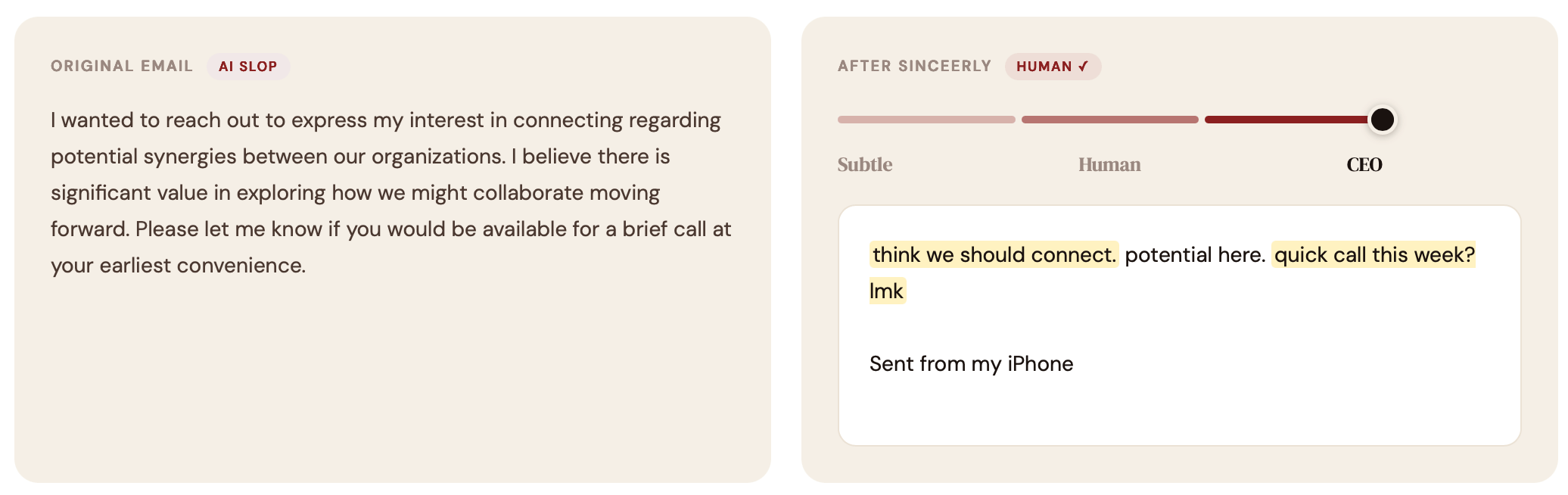
I tested Sinceerly by cold emailing 5 Fortune 500 CEOs. 4 CEOs replied. Of those replies, each was under 10 words. 2 replies had typos. One reply called me Larry (my name is Ben).
Jakob Nielsen: ‘Buy the Book Already’
∞ Jun 16, 2026Usability legend Jakob Nielsen offers a thorough review of Sentient Design (plus a detailed comic-strip summary!). His conclusion: “Buy the book already.”
Jakob’s review focuses especially on bespoke UI, one of Sentient Design’s 14 experience patterns. There are many types of intelligent interfaces, but bespoke UI is among the most radically adaptive, assembling GUI interfaces on the fly. When handled well, it provides just the right interface for the moment. When handled poorly, it can be confusing and disorienting, a robot fever dream. As Jakob calls out, this is an experience that requires fresh technique and perspective for designers.
The role of the designer transforms from placing pixels to acting as a creative director for a system that designs its own moment-to-moment experiences. …
The vision also sharpens a tension the field has barely begun to address: bespoke, ephemeral interfaces collide with consistency, the property that lets users transfer skills between products (Jakob’s Law) and lets one user help another. And if every screen is generated fresh, you can no longer usability-test “the design,” because that exact design will never exist again. Evaluation must move up a level: we will test the component library, the constraints, and the generation rules rather than individual screens. QA the factory, not every widget it produces. That shift, too, is part of the creative-director role Clark and Kindred describe.
A Great Design Gathering
∞ May 18, 2026Leonardo De La Rocha describes his takeaways from Design Futures Assembly, a remarkable gathering of the tech industry’s top design leaders. It was a small-ish invite list, just 60 of us including Veronika and me. The heads of design were there from companies including Anthropic, OpenAI, Microsoft AI, Google Search, Adobe, Figma, Expedia, Pinterest, Meta, and on and on.
Jeff Veen brought this group together to consider nothing less than the future of design: how AI is changing the tools, process, and material of our work. The conversations were frank, vulnerable, and curious.
Leonardo does a terrific job of synthesizing the themes that came out of the day, and I recommend that you take a moment to digest his piece. And please forgive me for indulging in this passage about our book Sentient Design, advance copies of which were floating around the room:
There was a book that surfaced in the corners of conversation throughout the day, and which I have ordered enough copies of to embarrass anyone in my immediate professional vicinity. It is called Sentient Design, by Josh Clark [and Veronika Kindred], and the framing it offers (treating AI as a design material rather than as a feature or a tool) is the most useful conceptual move I have seen for this moment. I will not summarize it here, because I would rather you read it. I will say that the design leaders in the room who had already read it carried themselves slightly differently from the design leaders who had not, in a way that was hard to put my finger on at the time and that I think I now understand. They had a vocabulary. The rest of us were borrowing one as we went.
This passage makes my heart sing because it perfectly encapsulates why we wrote the book in the first place: to shift perspective, to inspire action, and to provide shared context and language. To find the book and our ideas doing that work in a room of this caliber was incredibly heartening. Thank you, Leonardo.
Kirkus on Sentient Design: “Get It”
∞ May 18, 2026Kirkus Reviews calls Sentient Design “an essential guide for building responsible and revolutionary AI-mediated user experiences.” Their verdict: “Get it.”
In this insightful manual, Clark and Kindred define sentient design as the practice of creating intelligent interfaces that adapt to real-time user context. …
This work is distinguished from standard tech guides by its measured, ethical stance; Clark and Kindred dedicate space to defensive design, teaching readers ways to manage the often fickle, sycophantic, and hallucinatory nature of AI. The authors offer practical design techniques for handling bias and overconfidence, emphasizing that systems must remain adherent to human interactions and judgment. …
The collaborative voice of the authors infuses a tone of experienced wisdom into the text, effectively blending high-tech subject matter with human-centric techniques and values that will be useful to product leaders and designers.
Kirkus is like the Associated Press of book reviewers: sturdy, reserved, to the point. The warm recommendation means a lot to Veronika and me as authors; we hope it means something to you as potential readers, too.
Sentient Design will be released on June 9, 2026. The book is available for pre-order from Rosenfeld Media (15% preorder discount), Amazon, and all your favorite booksellers.
Reimagining the Mouse Pointer for the AI Era
∞ May 18, 2026Google DeepMind shared experimental demos of a “magic pointer,” an AI-enabled cursor that understands the thing(s) you’re pointing at and lets you speak commands or questions about them.
- Point at a recipe and ask to add its ingredients to your shopping list.
- Hover over a table of stats and ask for a visual chart of the data.
- Point at a picture of a place and ask where it is, or how to get there.
- Compare this product to that product.
For decades, computers have only tracked where we are pointing. AI can now also understand what the user is pointing at. This transforms pixels into structured entities, such as places, dates, and objects, that users can interact with instantly. A photo of a scribbled note becomes an interactive to-do list; a paused frame in a travel video becomes a booking link for that cool-looking restaurant.
Try the live demos for editing an image or finding a place on a map. There’s still some jank and a bit of delay, but the concept is clear and sound: apply intelligence at the point of interaction, not off to the side or in another app. Google says it’s bringing the feature into the Chrome browser and its new Googlebook OS.
The magic pointer is a tidy distillation of Sentient Design, the practice of creating intelligent interfaces with the awareness and agency to respond to users in the moment. More specifically, this is an example of Sentient Design’s continuous copilot experience pattern, borrowing the interaction of an inline tool. (We’ve got an entire chapter on these experiences in the Sentient Design book.)
Like all continuous copilots, the magic pointer is ambient and deferential, standing at the ready until summoned to support the current task. It folds in the interaction of an inline tool, acting as a super-powered alternative to a contextual menu. It’s the cousin of Android’s “circle to search” feature, a mode that lets you circle anything on the screen to trigger a search for more info.
A few valuable lessons worth calling out for designers exploring this space:
- The feature embraces the power of casual fuzzy language; you can just gesture and refer to “this” or “that” and the system can infer context and intent.
- The feature is additive, not replacing; it doesn’t change underlying behavior, and you’re not obliged to use it if talking to your computer isn’t your thing.
- The “copilot” posture is distinct from the tools, chat, or agents postures, each with its own relationship to the user. Copilots stand by out of sight until there’s an opportunity to help. (Meanwhile, you use tools, talk to chat, and delegate to agents.)
- Like most copilots, this feature is an overlay on the existing interaction. It doesn’t require a separate mode or application; it blends into the current interaction paradigm instead of replacing it.
Continuous copilots tend to be most powerful as “always on” system-level integrations, so they’re often the province of platform owners. But these experiences can also be useful as application-wide interactions, too, as Google’s Chrome integration suggests. For product designers, features like the magic pointer can prompt useful questions about whether and how copilot experiences might be meaningful to your users. Ask yourself:
- What is the context that only your system’s environment can uniquely gather?
- How can that knowledge support the user in the moment?
- How might that information inform actions beyond the screen; what adjacent systems or experiences can you reach?
The opportunity with Sentient Design in general is to bring action closer to context and intent. Think beyond chat: what happens when you weave intelligence into the interface itself, making familiar interactions more helpful and aware?
What does AI do to software?
∞ Apr 11, 2026Benedict Evans surveys what AI does to software, and it certainly doesn’t kill it. He covers the familiar shifts: faster development, new AI-powered features, and likely disruption of incumbent software solutions. But then he turns to the most interesting question: what forms will intelligent interfaces take, and how will those forms change both business and customer?
Evans considers how SaaS and mobile both changed what software (and software companies) look like:
One way to think about both of these is that the first step was to do the old thing with a new tool, but the next step was to think of things that were native to the new form. We started by making a Flickr app for mobile, and then we made Instagram, and then we got Snap and TikTok, which embraced the fact that this was a device with a camera, and a touchscreen, and its own compute instead of just a website. Some of the early thinking around AI software is to look at generative interfaces, to think about how dynamic and intelligent the screens could be, and to wonder if you might move away from carefully fixed screens and predefined workflows. No one really knows, but a lot of people will have fun experimenting. …
As I say, in almost every essay, meanwhile, this is all very 2007, or 1997, or very 1982. We know this is huge, we can sort of see some of what’s coming, but we don’t really know how any of this is going to work. And so, there is an enormous amount of white space out there, for people to go out and create things, that have nothing to do with stupid ideas like ‘software is dead’.
Generative interfaces. Dynamic and intelligent screens. A shift away from static workflows.
Amen. That white space is where a new era of intelligent interfaces lives, and it’s exactly the territory that Sentient Design maps out. If you’re one of those people who will “have fun experimenting,” Sentient Design’s framework and design patterns will give you a head start. Get after it.
AI is the Closest Thing to a Genie Lamp
∞ Apr 11, 2026“AI is the closest thing in the world to a genie lamp,” writes Alberto Romero in the Algorithmic Bridge newsletter. His point: while the “magic” might be remarkable, it shifts the effort to the wish. When AI can manifest what you ask on demand, the hard part becomes naming what you actually want. Alas, most people (and organizations) aren’t very good at that part.
The idea of thinking about “single-use” magical objects is that they invert the effort allocation 100%: the “how” is fully outsourced. How does the genie get you a billion dollars? How does it make you extremely handsome? You don’t care, you don’t want to know. So, you automatically realize that your mental effort must now be fully devoted to the complementary question: what do you want? …
The belief that doing takes more resources than deciding what to do has been the default operating mode for basically all of human life. The how has always been so expensive that the what barely matters. You didn’t need to be good at wishing because you were never going to get most of what you wished for anyway.
So now you can get what you wished for (in software and software-shaped problems, at least). As that capability becomes more equally absorbed, the differentiator won’t be speed or execution but knowing what to make in the first place. Romero points out that sometimes people call this critical POV by a number of different names: taste, judgment, decision-making, agency, curiosity, or imagination. “For a while, I thought these were all the same thing in various disguises,” he writes. “But I think they’re actually different skills that all became load-bearing at once.”
All these skills share a family resemblance—they’re all “what” skills rather than “how” skills—but they’re not interchangeable. Someone can have extraordinary taste and zero agency (the critic who never creates). Someone can have strong agency and terrible judgment (the founder who moves fast toward the wrong thing). Someone can have all the curiosity in the world and zero agency (the vibe-coder who is handling 10 projects at once but none of them will have any impact in the world). Etc.
All these skills are also well-known to those who have dedicated time to thinking about these matters, but for the rest of us, they were all invisible before because the “how” bottleneck was sitting in front of them like a boulder blocking a cave entrance. Now the boulder is rolling away and it turns out there’s an entire stack of capacities behind it that most people never developed because they never had to.
When you suddenly have the ability to do anything—and fast—then the critical skill becomes knowing what to build. And those people Romero mentions, the ones with “dedicated time to thinking about these matters”? Those people are called designers. The best designers have the skill to learn the outcomes that people truly need… and from there, work through the frictions blocking those outcomes to finally understand the deep, twisty heart of the problem. Naming the outcome and the problem is how you begin to work toward a solution—the what, not the how.
AI is just a technology. It’s a strange and powerful one, but in the end it’s an implementation detail (so is the genie and its lamp). We’ve got a new and burgeoning ability to make our ideas real, and a whole set of newly possible shapes those ideas can take. What shall we do with that? The genie can grant the wish, but it can’t tell you what to wish for. That’s always been the designer’s job.
An Anti-AI Moral Stance?
∞ Apr 11, 2026AI is powerful and strange, but the technology itself is also deeply fraught. I’m generally optimistic about what AI will unlock, but let’s not be naive: AI threatens steep environmental, social, and creative costs. It raises urgent questions about copyright, labor, and what it means to make things. The cynical deployment of AI wrings out efficiencies at human expense. The creators of the leading AI models have engaged in the purest form of extractive capitalism to date, slurping up all the world’s content without compensating its creators. So yeah, that’s a lot.
Mainstream surveys from Pew, Quinnipiac, Gallup, and others show a general unease about trust and consequences with AI, even as usage increases. (A 2025 Gallup study found that 64% of Americans plan to “resist using AI as long as possible.” And indeed, a more recent Pew study finds that 65% don’t use AI much at work.)
But what if your feeling is stronger than unease? What if you find the whole enterprise so immoral that you can find no ethical use for AI?
“Mike in Massachusetts” asked that very question in the Work Friend advice column of the New York Times. The columnist’s pragmatic answer echoes how you might think about living within any system whose foundations or effects you can’t abide (late-stage capitalism, fossil fuels, fast fashion, industrial food,etc.):
What’s your goal in refusing to use A.I.? Saving your immortal soul? Throwing a small wrench in the enormous cogs of capital? Will refusing its use do anything to stop its relentless advancement, or just make you feel righteous?
A.I. boosters and critics alike often talk about the technology in revolutionary — if not apocalyptic — terms, which can make the risks of using A.I. (or not) feel overwhelming. To use A.I. feels like participating in morally bankrupt process of technological exploitation, on the one hand; to refuse it feels like consigning yourself to obsolescence and unemployment.
But the stakes are just not that high. If you decline to use A.I., you may end up working a bit harder than your peers, but the process of adopting A.I. will occur over a long timeline, in stops and starts, and the risk of being left fatally and irreversibly behind is low. At the same time, your individual decision to use it won’t make a huge difference to the tech companies you’re wary of on their march to economic domination.
Which is why my recommendation is to refuse the choice you’re offering yourself. Why not use A.I. in circumscribed and deliberate ways to make your work life better? You won’t be refused entry to heaven because you prompted Claude to organize a data set and saved yourself some time and eye strain.
Meanwhile, you could channel your outrage into organized political action rather than an individual ethical choice by joining and supporting climate or labor advocacy groups that are thoughtfully working on the issue. If you’re morally against A.I., you owe yourself and the people in your community more than just a private protest.