How Many Products Does Microsoft Have Named ‘Copilot’?
By
Josh Clark
Published Apr 6, 2026
Names matter. That’s especially true when we’re all trying to establish shared meaning in something new.
Alas, at Microsoft, the name “Copilot” means very little except for a hand-wavey gesture in the direction of “has AI.” Tey Bannerman is doing the heroic work of tracking down the number of products and features named Copilot, and he’s up to 80 and counting.
“There are now Copilots inside Copilots, Copilots for other Copilots, and a physical Copilot key on your keyboard for summoning them,” Bannerman writes. Microsoft applies the label to apps, features, platforms, a keyboard key, and an entire category of laptops. When everything is Copilot, nothing is Copilot.
This is a marketing problem for Microsoft, but it also points to a general fuzziness problem in the industry. The meanings of terms like “agent,” “copilot,” even “AI” itself have grown so diffuse as to be useless for common understanding even within discrete teams or organizations. (Somehow, even traditional automation is called agentic lately, but that’s a post for another time.)
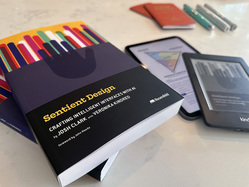
One of the goals that Veronika and I had for writing the Sentient Design book was to create crisp vocabulary and definitions for different experience types. For what it’s worth, “copilot” is one of the four fundamental “postures” in Sentient Design from which all intelligent interfaces derive. Our definition:
Copilots provide continuous, context-aware assistance throughout an activity.
This always-on stance of constant monitoring and assistance is different from the other postures of tool, chat, and agent. Posture determines the system’s manner and relationship with the user. More than just differences in functionality, these postures describe the different ways users collaborate with intelligent interfaces:
- People use tools.
- People talk to chat.
- People delegate to agents.
- People are backed by copilots.
From those four postures, over a dozen novel experience patterns emerge. Sentient Design describes them all, along with the emerging UI and interaction patterns to make them useful.
When you’re making something new, apply some rigor to what you call it. A crisp definition not only helps you describe the thing, it helps you shape what you make—and make it distinct from its neighbors. It tells you (and your customers) not only what it is, but what it’s not.